
Last updated on
Oct 31, 2026

CT CT-HR-13 2010-2026 free printable template
pdfFiller is not affiliated with any government organization

Fill out
Complete the form online in a simple drag-and-drop editor.

eSign
Add your legally binding signature or send the form for signing.

Share
Share the form via a link, letting anyone fill it out from any device.

Export
Download, print, email, or move the form to your cloud storage.
Why pdfFiller is the best tool for your documents and forms


End-to-end document management
From editing and signing to collaboration and tracking, pdfFiller has everything you need to get your documents done quickly and efficiently.
Accessible from anywhere
pdfFiller is fully cloud-based. This means you can edit, sign, and share documents from anywhere using your computer, smartphone, or tablet.
Secure and compliant
pdfFiller lets you securely manage documents following global laws like ESIGN, CCPA, and GDPR. It's also HIPAA and SOC 2 compliant.
What is CT CT-HR-13
The Addendum to Application for Examination or Employment CT-HR-13 is a legal document used by job applicants in Connecticut to disclose any criminal convictions as part of the employment process.
pdfFiller scores top ratings on review platforms




Who needs CT CT-HR-13?
Explore how professionals across industries use pdfFiller.

CT CT-HR-13 is needed by:
-
Job applicants in Connecticut
-
Employers conducting background checks
-
Human resources departments
-
Legal advisors ensuring compliance
-
Recruitment agencies
Comprehensive Guide to CT CT-HR-13
What is the CT-HR-13 Form?
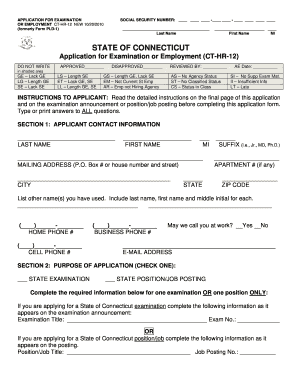
The Addendum to the Application for Examination or Employment (CT-HR-13) is a critical document designed for job applicants in Connecticut. Its main purpose is to disclose any criminal convictions the applicant may have, helping to ensure transparency in the employment process. By integrating the CT-HR-13 form into the application process, employers can evaluate candidates more fairly and comprehensively.
Purpose and Benefits of the CT-HR-13 Form
Disclosure of criminal history is essential during the employment application process. The CT-HR-13 form provides a structured way for applicants to share this information, promoting transparency, which can foster trust with potential employers. Additionally, this form offers legal protections, reassuring applicants that their disclosures will be handled with care and relevance to their employment suitability.
Key Features of the CT-HR-13 Form
The CT-HR-13 form includes several key sections that are vital for applicants to complete effectively:
-
Personal information fields that require details such as name, address, and Social Security number.
-
Questions regarding criminal history that help assess the applicant's background.
-
Mandatory fields that must be completed before submission.
-
A signing requirement to validate the authenticity of the provided information.
Furthermore, the form is available in a fillable format, simplifying the application process for users.
Who Needs the CT-HR-13 Form?
The primary users of the CT-HR-13 form are job applicants in Connecticut. Certain categories of applicants, such as those seeking employment in sensitive positions or industries, may be required to submit this form. It is particularly significant for applicants with criminal convictions, as it provides a way to transparently communicate their background to prospective employers.
How to Fill Out the CT-HR-13 Form Online
Filling out the CT-HR-13 form online through pdfFiller is straightforward. Here’s a step-by-step guide:
-
Gather necessary information, including personal data and details of any criminal history.
-
Access the CT-HR-13 form on the pdfFiller platform.
-
Fill in personal information fields as required.
-
Complete the criminal history section accurately.
-
Utilize features such as auto-save and eSignature capabilities.
Common Errors and How to Avoid Them
Applicants often make frequent mistakes when completing the CT-HR-13 form. To avoid these errors, consider the following tips:
-
Double-check all entries for accuracy and completeness.
-
Ensure that all mandatory fields are filled out before submission.
-
Review the entire form thoroughly for any overlooked information.
Taking these precautions can help prevent delays in the processing of the application.
Filing and Submission Process for the CT-HR-13 Form
Submitting the completed CT-HR-13 form in Connecticut requires attention to specific details:
-
Forms must be submitted to the designated employer or agency.
-
Be mindful of applicable deadlines to ensure timely processing.
-
Late submissions may lead to consequences, including disqualification from the application process.
Security and Compliance when Using the CT-HR-13 Form
When filling out the CT-HR-13 form, maintaining security is paramount, especially when handling sensitive information. pdfFiller employs robust security measures such as 256-bit encryption and compliance with privacy laws, including HIPAA and GDPR. Users can trust that their data will be protected and kept confidential throughout the process.
How pdfFiller Can Assist with the CT-HR-13 Form
pdfFiller's platform significantly streamlines the experience of filling out, signing, and submitting the CT-HR-13 form. Users can take advantage of features such as document editing, secure sharing, and easy eSignature solutions. Utilizing pdfFiller's tools can simplify the job application process and enhance overall user experience.
Securely Completing Your CT-HR-13 Form Today!
By leveraging pdfFiller, users can ensure a hassle-free experience when completing the CT-HR-13 form. The platform is designed for ease of use while maintaining a strong emphasis on security, making it an optimal choice for applicants seeking convenience and confidentiality.
How to fill out the CT CT-HR-13
-
1.Access the CT-HR-13 form on pdfFiller by searching for 'Addendum to Application for Examination or Employment.' Click on the form to open it in the editor.
-
2.Once the form is open, navigate through the fillable fields. Start by entering your last name in the designated field labeled 'LAST NAME.'
-
3.Proceed to fill in your first name in the 'FIRST NAME' field. Ensure all information matches your legal documents.
-
4.Next, enter your current address. Gather this information beforehand to ensure accuracy. Review the specific sections for any required details.
-
5.Enter your social security number in the appropriate field, keeping in mind the importance of privacy. Make sure you have your social security card or related documentation on hand.
-
6.Browse through checkboxes related to your criminal history. Mark them accurately based on your situation. Read each statement carefully to ensure truthful disclosure.
-
7.Once you’ve filled all applicable sections, locate the area for your signature. Sign where it states 'Applicant signature' to confirm the truthfulness of your statements.
-
8.Take a moment to review the entire form for accuracy. Verify that all fields are complete, ensuring you haven’t missed any important information.
-
9.After reviewing, use pdfFiller’s tools to save your work. You can choose to download the filled form for your records or submit it electronically through the designated submission process.
-
10.When submitting, follow the outlined procedures to ensure your application is received. Check for any confirmation notifications to secure proof of submission.

Who is eligible to use the CT-HR-13 form?
The CT-HR-13 form is intended for job applicants in Connecticut who need to disclose any criminal convictions as part of their employment application process. It is essential for anyone applying for positions that require background checks.
Is there a deadline for submitting the CT-HR-13 form?
While specific deadlines may depend on the employer's requirements, it is advisable to submit the CT-HR-13 form with your application to avoid delays in processing your job candidacy.
How do I submit the completed CT-HR-13 form?
You can submit the completed CT-HR-13 form electronically via pdfFiller. Follow the on-screen submission process after filling out the form. Alternatively, download and print it to submit by mail, if required.
What supporting documents do I need when completing the CT-HR-13 form?
You'll typically need personal identification documents, such as a driver’s license or state ID, and your social security number. No additional supporting documents are usually needed unless specified by the employer.
What common mistakes should I avoid when filling out the CT-HR-13 form?
Common mistakes include providing inaccurate personal information, omitting required disclosures, and failing to sign the form. Always double-check your entries for spelling and required fields.
How long does it take to process the CT-HR-13 form?
Processing times for the CT-HR-13 form can vary depending on the employer's procedures. Generally, expect a few days to a couple of weeks. Check directly with the employer for specific timelines.
What should I do if I have questions while filling out the CT-HR-13 form?
If you have questions while completing the form, consult with the HR department of the employer you're applying to or seek assistance from legal advisors familiar with employment forms in Connecticut.
Related Content
Related Forms



Related Catalogs
Get the latest insights from our blog



If you believe that this page should be taken down, please follow our DMCA take down process
here
.
This form may include fields for payment information. Data entered in these fields is not covered by PCI DSS compliance.